Learn more about disabling CORS, Navigator.mozTCPSocket, and issues with Let’s Encrypt and Sectigo certificates on KaiOS
XMLHttpRequest without CORS
There are several ways that dynamic web apps communicate with a back-end server. XMLHttpRequest (XHR) is the original method, used heavily in AJAX programming. XHR allows web apps to make a variety of HTTP requests like GET, PUT, POST, and DELETE, both synchronously (now deprecated) and asynchronously.
KaiOS fully supports XMLHttpRequest, including a few non-standard flags that can be provided to it’s constructor.
1let xhr = new XMLHttpRequest({
2    mozSystem: true,
3    mozAnon: true,
4    mozBackground: true,
5})
The first, and perhaps most useful flag is
mozSystem. Privileged apps with the
systemXHR permission are allowed to set this flag. Setting it to true disables the same origin policy for the request, allowing requests without the usual Content Security Policy (CSP) errors.
Content Security Policy: The page’s settings blocked the loading of a resource at https://podlp.com/ (“connect-src”).
The second flag,
mozAnon, works in tandem with the first. In fact, this flag is enabled whenever the mozSystem flag is used (see
nsXMLHttpRequest.h). Setting mozAnon ensures the request is sent anonymously, without cookies or authentication headers. It will also throw an error if you attempt to enable withCredentials.
The final flag,
mozBackground, is for background service requests. This causes the request to fail in cases where a security dialog (such as authentication or a bad certificate notification) would be shown.
Fetch
In addition to XHR, KaiOS also supports the Fetch API. Similar to XHR, apps holding the systemXHR permission are granted special treatment for requests made with the mode no-cors. For instance, the
header list is not constrained and a successful request will resolve to a
basic response instead of an opaque response.
1fetch('https://google.com', {
2    method: 'GET',
3    mode: 'no-cors',
4})
Note: this behavior is only available on KaiOS 3.0 devices. For better compatibility, developers will continue to prefer XMLHttpRequest with the mozSystem flag which works on both KaiOS 2.5 and 3.0.
TCPSocket API
KaiOS includes the non-standard navigator.mozTCPSocket API for establishing lower-level TCP socket connections. This API is exposed to Privileged apps with the
tcp-socket permission and allows developers to implement protocols on top of TCP like IMAP, IRC, POP, or HTTP.
Apps can both open and listen for socket connections, sending and receiving data either in String or ArrayBuffer format. This allows apps to act as both clients and servers, exposing connections over localhost within and between apps (although multi-tasking on KaiOS is quite limited). Uses cases include:
- Sending and retrieving emails over POP or IMAP
- Chatting via an IRC client
- Transferring files over FTP
- Issuing direct DNS queries, instead of DNS over HTTPS (DoH)
Creating a local HTTP server also allows applications to serve up content requested by image, audio, and video elements, similar to a ServiceWorker but without limitations. Of course this comes with the added complexity of writing your own HTTP server, and for multimedia requests also requires handling Range requests.
Note: There is also a sibling UDPSocket API for UDP socket connections, accessible via the
udp-socket permission.
Let’s Encrypt SSL Certificate Issue
Let’s Encrypt (LE) is an open certificate authority (CA) that issues free SSL certificates, allowing websites to serve content over HTTPS. LE is so popular that it has issued more than one billion certificates. SSL certificates are important for many reasons, and in 2023 they are effectively required to avoid visitors seeing scary warning messages stating, “This Connection is Untrusted.”
In September 2021, the IdenTrust DST Root CA X3 root certificate used by Let’s Encrypt expired. For most internet users, this was a non-event because modern web-enabled devices include new root certificates with regular updates. However, most budget mobile phones including KaiOS devices do not receive regular over-the-air (OTA) updates. That means that as of the time of writing, most phones running KaiOS 2.5 will flag Let’s Encrypt SSL certificates as insecure.
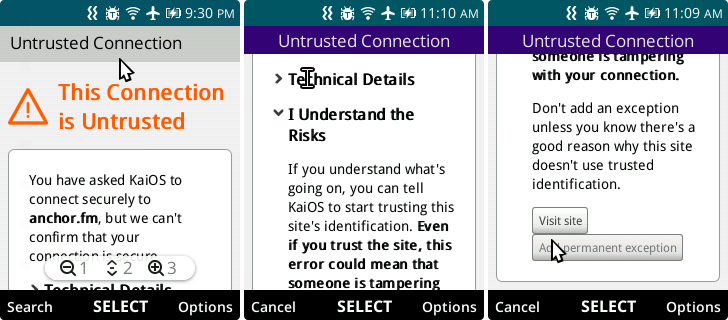
As a developer, this means that XMLHttpRequest and Fetch requests to hosts using LE certificates will silently fail with no catchable error.
Sectigo USERTrust RSA
In October 2025, Sectigo migrated all certificate issuance from its “legacy” multi-purpose Root CAs to modern single-purpose Root CAs. Similar to Let’s Encrypt, legacy roots such as COMODO and USERTrust lost trust in KaiOS. Unlike Let’s Encrypt, KaiOS Technologies has not published an update via the KaiStore to fix this. That means Sectigo SSL certificates should not be used on KaiOS 2.5.
Recommended Certificate Authorities (CA)
KaiOS itself hosts APIs on Amazon Web Services (AWS), leveraging Amazon Certificate Manager (ACM) for SSL certificates and serving traffic via AWS Cloudfront. Cloudflare and Google Trust Services (GTS) are also still supported. It’s best to use certificates issued by these providers, and fortunately these CAs typically offer certificates at no cost.
Certificate Detection
Fortunately, while XHR does not expose the necessary error messages, it is possible to detect invalid SSL Certificates on KaiOS using mozTCPSocket. The function below returns a Promise that resolves to true when the SecurityCertificate is thrown.
 1// @returns [Promise<Boolean|null>] True if the host has an invalid SSL certificate
 2function isInvalidCertificate(host, timeout = 1000) {
 3  // API not available, either not KaiOS or missing permission
 4  if (!navigator.mozTCPSocket) {
 5    return Promise.resolve(null);
 6  }
 7
 8  return new Promise((resolve) => {
 9    let timeoutId;
10    let isResolved = false;
11    const socket = navigator.mozTCPSocket
12      .open(host, 443, { useSecureTransport: true });
13
14    // Closes socket, if open, and resolves Promise
15    const closeAndResolve = (event) => {
16      if (socket.readyState !== 'closed') {
17        try {
18          socket.close();
19        } catch (e) {
20          console.warn(e);
21        }
22      }
23
24      // Handle SSL Certificate Scenario
25      if (event.type === 'error') {
26        if (event.name === 'SecurityError' && event.message === 'SecurityCertificate') {
27          isResolved = true;
28          clearTimeout(timeoutId);
29          return resolve(true); // True = Invalid
30        }
31      }
32
33      isResolved = true;
34      clearTimeout(timeoutId);
35      return resolve(false); // False = Valid
36    };
37
38    // Set socket timeout
39    timeoutId = setTimeout(() => {
40      if (!isResolved) {
41        closeAndResolve(false);
42      }
43    }, timeout);
44
45    socket.addEventListener('data', closeAndResolve);
46    socket.addEventListener('error', closeAndResolve);
47  });
48}
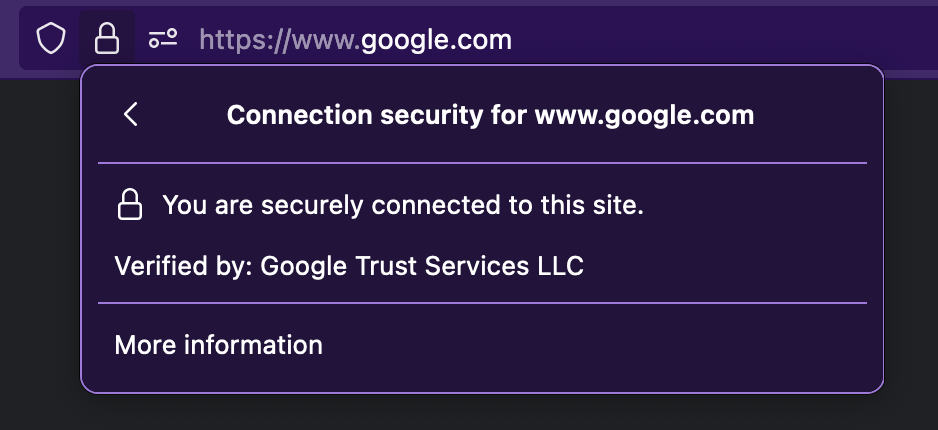
As expected, isInvalidCertificate resolves true for anchor.fm which uses a Let’s Encrypt SSL Certificate, and resolves false for google.com which uses a certificate issued by Google Trust Services.
Tip: in Firefox if you click the lock icon then the arrow under “Connection secure,” you can see SSL certificate details.
Conclusion
KaiOS offers a variety of APIs to make external requests like a native app, including XHR and Fetch without CORS, as well as TCP and UDP Socket connections. All required permissions are only available to packaged Privileged applications, but enable your application to use third-party APIs, services, and protocols without running into Content Security Policy issues.
If you find these nuances daunting and need support developing tightly-integrated experiences on KaiOS, contact the author from the About page.