JScalated exploits a Mozilla web development feature left enabled by the developers of KaiOS. It allows custom JavaScript execution in the context of the currently displayed webpage. On most operating systems, this would not give users significantly more control over their devices. However, KaiOS allows certain system applications to access privileged APIs that ordinary websites cannot use.
JScalated is intended for users who want to enable development tools on their phones, such as the Android Debug Bridge (ADB), and gain more control over their devices. Although the technique is primarily intended for use on your own phone, it also has security implications. Its availability depends on the device, firmware, and security restrictions.
The ADB feature uses a chain of exploits and tricks. Below is a write-up of how each exploit was found:
In April 2026, the author discovered that JavaScript could be executed directly from the address bar on KaiOS phones by using the javascript: URL scheme. This allowed JavaScript to run in the context of the currently displayed webpage, including pages belonging to the System application. It did not, however, provide access to privileged chrome:// documents. After quite a bit of testing, the author found that remote scripts could be loaded by first creating a script element with javascript:document.createElement('script'). For reasons that are not yet understood, this extra step is necessary on the tested devices before the remote loader can execute reliably.
Later, another useful discovery was made involving the window.name property. Older versions of Firefox allowed this property to persist across navigations between different origins, and the version of Gecko used by KaiOS 3.x still had this behavior. This meant the JScalated website could prepare a script, store it in window.name, and then navigate to system.localhost, where the stored content could be loaded using javascript:document.write(name). Aside from making the loading process much simpler, this reduced the original, rather lengthy JavaScript command to something that users could realistically type on a phone keypad. More importantly, the script would execute in the context of the System page rather than the original website, giving it access to the privileged APIs available to that page.
Shortly after this discovery, JScalated v1 was released. Unfortunately, while the JavaScript execution technique worked on the tested devices, the original method of obtaining a shell depended on firmware-specific behavior that had already been restricted on many KaiOS phones. As a result, only a relatively small number of devices could be jailbroken with the tool. JScalated v2 was later released, but was pulled after about a day when the author realized it was still limited by essentially the same restrictions.
After roughly six months away from the project, the author returned to researching KaiOS with a much better understanding of Firefox and its underlying architecture. After about a day of searching, attention turned to navigator.b2g.getDeviceStorage('apps'), an API intended to give appropriately privileged applications access to application data. Unlike ordinary website storage, this API provides access to files in the device’s underlying storage. Research into the API and its filesystem operations revealed a promising route to writing files in parts of /data, including the Mozilla profile directory. This was particularly interesting because /data contains much of the persistent application and system data on KaiOS.
At this point, the biggest challenge was no longer getting JavaScript execution or even writing files. It was finding a way to turn that filesystem access into more privileged code execution. Several approaches were considered, including replacing an existing executable such as the updater daemon. Unfortunately, replacing the executable also affected the permissions needed to run it, making that approach impractical. Initially, the Mozilla profile did not look much more promising. However, a different approach involved placing a user.js file inside /data/b2g/mozilla/<profile>.default/ to configure Gecko’s extension-loading preferences, along with a manually installed .xpi extension in the profile’s extensions directory. The important distinction is that user.js itself does not execute arbitrary JavaScript; it only sets preferences that Gecko reads during startup. The extension still has to be recognized and loaded before its code can execute.
This eventually provided a route to code execution with access to the B2G environment. While this is a major improvement over JavaScript running inside the System application, it is not the same as obtaining unrestricted root access. B2G still operates under its own Linux permissions and SELinux restrictions, leaving certain directories inaccessible or read-only.
Surprisingly, even this level of access was not enough to authorize ADB. For some context, enabling the ADB service on KaiOS 3.x has often been relatively straightforward, but getting a computer authorized to connect is a different problem entirely. ADB uses a public-key authentication system, with user-authorized keys normally stored in /data/misc/adb/adb_keys. Although the B2G environment could access much of /data, it could not simply write the required authorization file into this protected directory.
After weeks of investigating the filesystem restrictions, the author discovered another way around the problem. The approach involved temporarily moving the existing /data/misc directory, recreating its structure, and restoring the original data while handling the ADB directory separately. This made a newly created adb_keys file accessible to the ADB daemon. Correct file ownership, permissions, and SELinux labels were and are needed, since creating the file alone would not guarantee that adbd could read it.
The final result was that, after the filesystem changes and a reboot, the computer was finally recognized as authorized. What had started as a way to run JavaScript from a phone’s address bar eventually developed into a much larger exploitation of KaiOS permissions, Gecko’s profile system, native code execution, and Android’s ADB authorization process.
Summary
As stated above, the exploit uses the javascript: URL scheme, a quick and popular method for testing websites using JavaScript. It is a built-in browser feature that can be used simply by typing javascript: followed by JavaScript code into the address bar.
JavaScript entered this way runs in the context of the currently displayed webpage. This distinction is important because an ordinary webpage does not have access to the same KaiOS APIs as a privileged system application.
JScalated uses this behavior, along with the window.name property, to load custom JavaScript into a System-origin page on affected KaiOS versions.
The tool has a wide range of capabilities, and more will be added as development continues. For those who want to enable debugging, gain more control over their devices, and experiment with KaiOS development tools, please follow the guide below.
Instructions
Connect your phone to the internet. Before proceeding, make sure your phone can access https://jscalated.netlify.app.
Navigate to the JScalated website using your KaiOS 3.x phone’s native browser. Select Load JScalated. The website will prepare the JavaScript loader and redirect you to
system.localhost/proxy.html.Once you have reached the blank System page, open the address bar without navigating away and type:
1javascript:document.createElement('script')On some builds, you should see:
1[object HTMLScriptElement]Open the address bar again and type the following JavaScript command to initiate the tool:
1javascript:document.write(name)
This loads the JavaScript previously staged in window.name into the current document. On affected KaiOS builds, the first command is necessary before the staged script can execute.
The window.name property is normally used to identify a browsing context. However, in the Firefox 84-based versions of Gecko used by KaiOS 3.0 and 3.1, its value can persist across certain navigations.
JScalated takes advantage of this behavior to carry its loader into the System application. The important part is that the JavaScript executes within the destination document’s context, potentially giving it access to that document’s permitted KaiOS APIs.
If the tool fails to load, return to the JScalated website and repeat the process. Make sure you enter both commands exactly and do not navigate away between them.
An older version of adb.js is also available as a GitHub Gist, originally referenced on June 24, 2026. However, this version may no longer reflect the current loading process.
The Tool and Its Features
The primary goal of JScalated is to help users enable and configure ADB on compatible KaiOS 3.x devices. Depending on the phone’s firmware and security restrictions, this may include wireless ADB setup and debugging-related configuration.
It is important to understand that starting the ADB service does not necessarily authorize a computer to connect. Some devices will start ADB successfully but still report the computer as unauthorized.
Another feature is the ability to disable certain preinstalled applications. Important system applications are protected from being disabled through the tool’s normal interface.
JScalated also provides development and diagnostic features that make it easier to experiment with the underlying KaiOS platform. The exact features available depend on the device and its security policy.
The project additionally offers JScalated Sideload, a separate tool that uses the AppsManager API to install packaged applications.
Firefox Debugger Socket
The Firefox remote-debugger socket is accessible on some KaiOS 3.x devices. This discovery is particularly useful because it provides developers with debugging capabilities similar to those available on older KaiOS versions.
However, not every device exposes the same debugging features, and root access has not been universally achieved.
On supported devices, the debugger can be configured using Firefox preferences. One method involves placing a user.js file in the active Gecko profile.
For example:
/data/b2g/mozilla/<Profile>.default/user.js
The contents could look something like this:
1user_pref("devtools.remote.usb.enabled", true);
2user_pref("devtools.debugger.remote-enabled", true);
3user_pref("devtools.debugger.unix-domain-socket", "/data/local/firefox-debugger-socket");
These preferences must be supported by the installed Gecko version to have an effect.
The user.js file is read during Gecko startup and is used to configure preferences. Despite its .js extension, it is not executed as arbitrary JavaScript.
If you already have shell access, you can set the file permissions and restart B2G where the device permits it.
For example, where f5b2oed3 is your unique profile ID:
1chmod 600 /data/b2g/mozilla/f5b2oed3.default/user.js
2setprop ctl.restart b2g
The restart command may be restricted on some devices.
Once ADB has been independently authorized, the following command may be used to forward an available debugger socket:
1adb forward tcp:6000 localfilesystem:/data/local/firefox-debugger-socket
This assumes that the socket exists and ADB is already authorized.
Using the Debugger Socket
Install a compatible version of Firefox, Pale Moon, or Waterfox Classic that supports the older WebIDE debugging interface.
Open the browser and look for WebIDE in its developer tools. The exact instructions will differ depending on which version you install.
More information about using the debugger socket can be found at Banana Hackers.
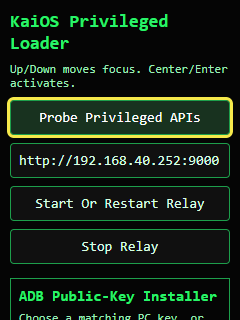
JScalated Use
To use JScalated, you will need a compatible KaiOS 3.x device. First, check your KaiOS version by navigating to Settings > Device > Device Information > Software.
If your device reports version 3.0 or 3.1, it may be compatible with JScalated. However, compatibility is not guaranteed, as some manufacturers have introduced additional security restrictions.
You can watch the JScalated Official Tutorial Video on YouTube or follow the instructions provided above.
Advanced Information Regarding the Exploit Primitive
The important distinction between JScalated and an ordinary website is the execution context.
JScalated runs JavaScript within a System-origin document, allowing it to interact with any privileged APIs exposed to that document. This includes portions of the B2G API and, where authorized, services provided through the KaiOS API daemon.
However, JavaScript execution within the System application is not equivalent to obtaining a native root shell. Each underlying process is still subject to its own permissions and SELinux restrictions.
These limitations are particularly important when working with filesystem operations, debugging services, and other privileged interfaces.
Research into these APIs and their security boundaries is ongoing.
Enjoy, and use responsibly!
Contributions
This article is the work of Samuel Erwin, contributed through GitHub, to inform the KaiOS developer community about security research, development tools, and methods of accessing additional debugging functionality on supported devices.